[Solucion]The site http has not been registered-[Google Authentication Service]

The page you have requested cannot be displayed. Another site was requesting access to your Google Account, but sent a malformed request. Please contact the site that you were trying to use when you received this message to inform them of the error. A detailed error message follows:

The site "http://www.*******.net" has not been registered.
Google Authentication Service da el este error al intentar acceder a la API desde un dominio, para Solucionarlo debemos seguir estos pasos:
1.- Ingresar a esta web:
https://accounts.google.com/ManageDomains
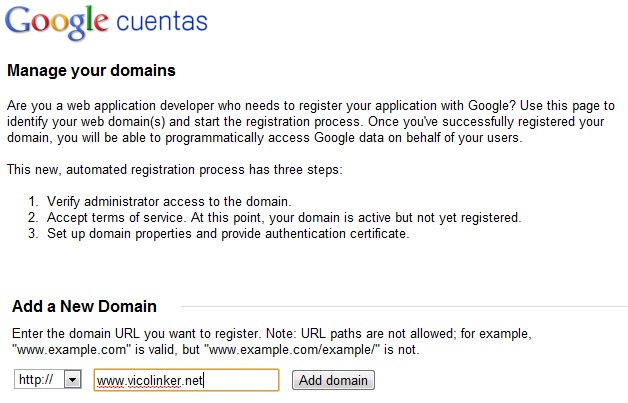
2.- En Add a New Domain agregamos nuestro dominio y damos click en Add Domain.
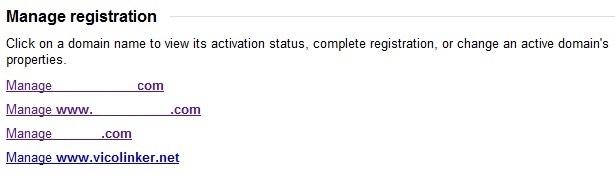
3.- Después de agregarlo nos aparece mas abajo Manage registration donde aparecera Manage www.vicolinker.net , le damos click.
4.- En este apartado en caso de no tener el dominio en Google Webmaster Tools deberemos de verificarlo con cualquiera de los siguientes métodos:
-Upload an HTML file to your server –> El método Recomendado, solo debemos descargarnos el archivo HTML de verificación y subirlo en la raíz de nuestra web.
-Add a meta tag to your site’s home page –> Agregando un Meta en el de nuestra web.
-Use your Google Analytics account –> En Caso de tener el Codigo de Seguimiento de Google Analitycs en la web.
-Add a DNS record to your domain’s configuration –> Se agrega un registro TXT a las DNS del dominio.
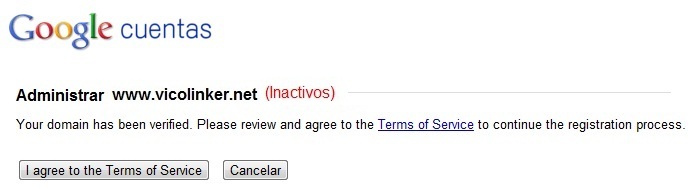
5.- Una vez verificado el dominio regresamos a Manage www.vicolinker.net y Aceptamos los Terminos del Servicio (I agree to the Terms of Service)
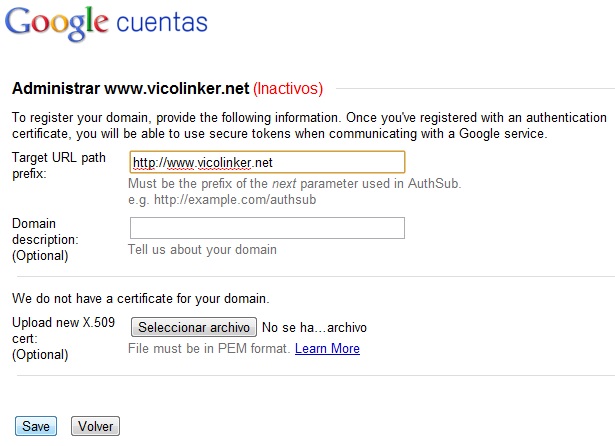
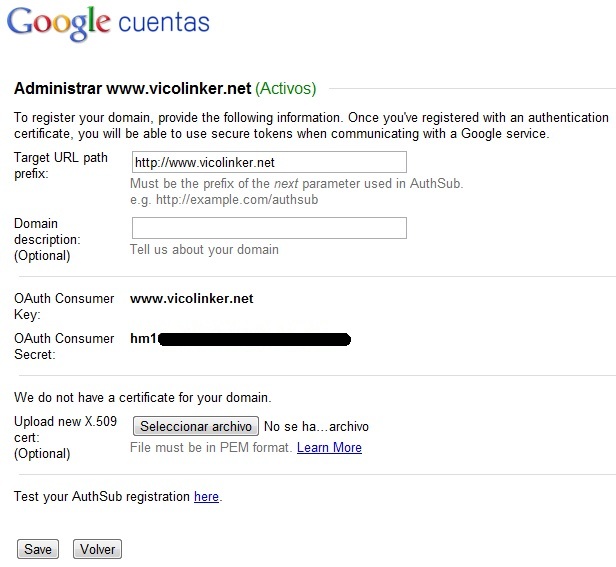
6.- Ahora en el campo Target URL path prefix agregamos nuestro dominio (No olvidar el http:// ) y damos a Save .
7.- Ahora nos aparecerá arriba (Activos) en verde, y ya podremos volver a intentar el acceso a la API.
Terminos de Busqueda:
- google dns helper 1 2 español
- solucion de this page is cannot displayed
Escríbeme un comentario si este contenido te fue útil o si te quedó alguna duda, así podré mejorarlo. Gracias!